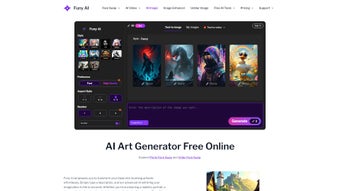

Download Funy AI – AI visual creation tool, free trial, easy download
Overview
Funy AI is a versatile web‑based application that removes the technical barriers to high‑quality visual creation. Designed for creators of every skill level, Funy AI lets you generate stunning artwork, cleanly remove backgrounds, enhance photos, unblur blurry images, and even apply realistic aging effects—all without the need for a cumbersome sign‑up process. The platform operates on a subscription model, but offers a generous free trial that lets you explore its core capabilities before committing. Because all content generated by Funy AI is placed in the public domain, you can use the results for commercial projects, client work, or personal branding without worrying about licensing restrictions. Whether you’re a graphic designer, marketer, social‑media manager, or hobbyist photographer, Funy AI provides a one‑stop shop for turning ideas into polished visuals quickly and securely.
What truly sets Funy AI apart is its focus on speed and simplicity. The AI art generator interprets plain‑text prompts and instantly produces unique illustrations, patterns, or abstract designs that would normally require hours of manual work. The background removal tool leverages deep‑learning segmentation to isolate subjects with pixel‑perfect edges, making it ideal for product photography or portrait retouching. Meanwhile, the photo enhancer and unblur functions use advanced neural networks to restore detail, correct exposure, and sharpen details that were previously lost. For professionals who need clean assets, the watermark remover strips unwanted branding from images, allowing you to reuse royalty‑free visuals without any trace of the original creator.
Funy AI’s cross‑platform compatibility ensures that you can access the service from Windows, macOS, iOS, or Android devices. The web interface is responsive and optimized for both desktop browsers and mobile screens, meaning you can edit on the go or from a powerful workstation. Security is baked into the platform: all uploads are encrypted in transit, and the service adheres to GDPR standards for data protection. Regular updates roll out new AI models and feature enhancements, guaranteeing that you stay ahead of the curve in visual AI technology.
Key Features That Power Your Creativity
- AI Art Generator: Turn simple text prompts into high‑resolution illustrations, abstract art, or stylized graphics in seconds.
- Background Removal: One‑click AI‑driven segmentation that isolates subjects with clean edges for transparent PNG outputs.
- Photo Enhancer: Automatic color correction, noise reduction, and detail recovery for DSLR, smartphone, or scanned images.
- Unblur Image Tool: Advanced de‑blurring algorithm that restores clarity to motion‑blurred or out‑of‑focus photos.
- Watermark Remover: Seamlessly erase watermarks, logos, or text overlays while preserving underlying image quality.
- AI Aging Filter: Apply realistic age progression or regression effects to portraits for storytelling or marketing.
- Batch Processing: Upload multiple files at once and let Funy AI handle bulk enhancements, background removals, or aging effects.
- Public Domain Output: All generated content is automatically released into the public domain, eliminating licensing headaches.
- Cross‑Platform Access: Fully responsive web app works on Windows, macOS, iOS, and Android without additional installations.
- Secure Cloud Storage: Temporary encrypted storage ensures your uploads are deleted after processing, protecting privacy.
Each feature is built on state‑of‑the‑art neural networks that have been fine‑tuned for visual fidelity. The AI art generator, for instance, uses a diffusion model trained on millions of public‑domain images, allowing it to mimic a wide range of artistic styles—from watercolor to cyber‑punk. The background removal leverages a segmentation model similar to those used in professional compositing suites, delivering edge accuracy that rivals manual masking. The photo enhancer combines HDR reconstruction with GAN‑based super‑resolution, giving you a tool that can upscale 4K images without noticeable artifacts.
Beyond the core toolkit, Funy AI offers a robust set of customization options. You can adjust the strength of the aging filter, choose from multiple unblur intensities, or specify color palettes for the art generator. These controls give power users the flexibility to fine‑tune outputs while still keeping the interface approachable for beginners. The platform’s subscription includes unlimited access to all features, regular model updates, and priority support, ensuring that your creative workflow remains uninterrupted.
Installation, Usage & Compatibility
Because Funy AI is a web‑based solution, there is no traditional “installation” process. Getting started is as simple as navigating to the official website, creating a free trial account (optional, but recommended for saving preferences), and uploading your first image. The platform is built with progressive web app (PWA) technology, meaning you can add a shortcut to your desktop or mobile home screen for an app‑like experience. For users who prefer a native feel, Funy AI offers lightweight wrapper apps for Windows and macOS that launch the web interface in a dedicated window, but these are optional and do not affect functionality.
Step‑by‑step guide:
- Open your preferred browser (Chrome, Edge, Safari, or Firefox) and go to funyai.com.
- Click “Start Free Trial” to create a temporary account, or simply drag‑and‑drop an image to begin without signing in.
- Select the desired tool (Art Generator, Background Removal, etc.) from the left‑hand toolbar.
- For text‑to‑image generation, enter a concise prompt (e.g., “sunset over a futuristic city”) and choose resolution.
- Click “Process” and wait 5‑15 seconds while the AI renders the output.
- Review the result, apply optional adjustments (strength, style, color), then download the final file in PNG or JPG format.
The entire workflow is designed to be intuitive, with real‑time preview thumbnails and progress bars that keep you informed. Because the service runs entirely in the cloud, your local hardware specifications have minimal impact on performance; even older laptops can produce high‑quality results as long as they have a stable internet connection.
Supported Operating Systems: Funy AI is fully compatible with Windows 10/11, macOS 11 (Big Sur) and later, iOS 13+ on iPhone/iPad, and Android 8.0+ on smartphones and tablets. The responsive design automatically adjusts UI elements for touch interaction on mobile devices, ensuring that tools like background removal are just as precise on a phone screen as they are on a desktop monitor.
For organizations that need tighter control, Funy AI offers an enterprise‑grade API that can be integrated into existing digital asset management (DAM) systems. The API respects the same public‑domain licensing, so assets created via programmatic calls can be safely redistributed across marketing channels.
Pros, Cons & Frequently Asked Questions
Pros
- No sign‑up required for quick one‑off tasks, saving time.
- All outputs are public domain, eliminating licensing concerns.
- Wide range of AI‑powered tools in a single platform.
- Cross‑platform web interface works on Windows, macOS, iOS, and Android.
- Secure, encrypted uploads with automatic deletion after processing.
- Batch processing capability for high‑volume workflows.
- Regular model updates keep the AI state‑of‑the‑art.
Cons
- Subscription required for unlimited access; free tier is limited in resolution.
- Reliant on internet connectivity; offline usage is not possible.
- Advanced fine‑tuning options are limited compared to dedicated desktop software.
- Public‑domain policy may not suit users who need exclusive rights.
- Processing speed can vary during peak server load.
Frequently Asked Questions
Is Funy AI really free to try?
Yes, Funy AI offers a free trial that lets you generate up to five images per day with limited resolution. No credit card is required, and you can upgrade to a paid plan at any time.
Can I use Funy AI on a Mac without a browser?
While the primary interface is web‑based, Funy AI provides a lightweight macOS wrapper that launches the service in a dedicated window, giving you an app‑like experience without a full installation.
How does the public‑domain licensing work?
All images generated by Funy AI are automatically released into the public domain. This means you can use, modify, and distribute them commercially without attribution or royalty fees.
Is my uploaded data safe?
Funy AI encrypts all uploads in transit using HTTPS and stores them temporarily. Files are automatically deleted from the server after processing, complying with GDPR and privacy best practices.
Can I integrate Funy AI into my existing workflow?
Yes, Funy AI offers an API for developers, allowing you to embed its AI tools directly into DAM systems, content management platforms, or custom web applications.
Conclusion & Call to Action
Funy AI positions itself as a powerful, all‑in‑one visual creation suite that eliminates the steep learning curve associated with traditional design software. Its blend of AI art generation, background removal, photo enhancement, and specialty filters delivers a comprehensive toolbox for marketers, designers, and casual creators alike. The public‑domain output model is a double‑edged sword: it offers unparalleled freedom for commercial use but may not suit those who need exclusive ownership of their assets. Nevertheless, the platform’s speed, cross‑platform accessibility, and secure handling of user data make it a compelling choice for anyone looking to accelerate visual production without sacrificing quality.
Pricing is transparent—a monthly subscription of $9.99 provides unlimited access to every feature, priority support, and early access to new AI models. For teams, volume discounts and enterprise‑grade SLAs are available, ensuring that larger organizations can scale the service while maintaining the same level of performance and security. Customer support includes live chat, detailed documentation, and a vibrant community forum where users share tips, custom prompts, and workflow hacks.
If you’re ready to experiment with AI‑driven design and want a hassle‑free experience, click the button below to start your free trial. Whether you’re polishing product photos, crafting social‑media graphics, or exploring creative concepts, Funy AI equips you with the tools you need—fast, secure, and ready to scale with your projects.



.png)



